Where every cent of the gap comes from.
Drop in two files that share a reference number, such as an invoice list and a bank export, or a payout report and a bank export, and Bijexa shows where the gap between the totals comes from, in plain words. It all runs on your own computer.
- Linux: in testing
- Windows: coming soon
- macOS: planned
- Adds up to the cent. Every row lands in one pile, and the piles add up to the whole gap.
- Messy files are fine.
ORD-0000123matchesord 123,1.234,50 €matches$1,234.50. - Any two files. No row limit on Professional and Firm. CSV and Excel on every plan; PDF, .xls and Parquet on Professional and Firm. Past Excel's 1,048,576 rows; tested to 20 million a side on 16 November 2026, on synthetic data (6 cores, 15 GB). Time and memory safety limits apply, as the FAQ says. Basic reads files up to 5,000 rows.
- Nothing is uploaded. It runs on your computer and reads your files where they are.
- Little setup. It finds the columns to match by reading the values where they allow it, and you pick them where they do not.
Bank is 13,376.51 lower than Marketplace in total.
On 100 of them, Bank is exactly 1.50 higher than Marketplace: this looks like a fixed fee or charge per row, not separate errors.
14,020.11 − 150.00 − 493.60 = 13,376.51
| Order ID | Net Payout | Referenz | Betrag | Result |
|---|---|---|---|---|
| ORD-0000200 | 176.27 | ord 200 | 177,77 | Differs −1.50 |
| ORD-0000333 | 80.21 | — | — | Only in Marketplace |
| — | — | ord 20001 | 12,34 | Only in Bank |
| ORD-0000001 | 88.52 | ord 1 | 88,52 | Matched |
| ORD-0000002 | 293.34 | ord 2 | 293,34 | Matched |
Two files in. The gap, split into its parts.
Drop in two files
Bijexa skips title rows and detects the delimiter and encoding. It reads amounts like $1,234.50, 1.234,50 € and (12.50), and dates written any common way.
It works out how they line up
Bijexa reads the values, not the column names. On the sample above it paired Order ID with Referenz (99.8% of IDs pair up, leading zeros ignored) and found the amounts agree on 99.5% of rows. When it isn't sure, it says so and shows you its best guess. Every setting stays one click away.
Read the review, keep the recipe
A verdict, each part with its share of the gap, and every row a click away. Export CSV, Excel or Parquet, or send the one-page report. Save it as a recipe, and next month just drop in the new files.
If your bank shows one deposit for many orders, the rows need adding up first.
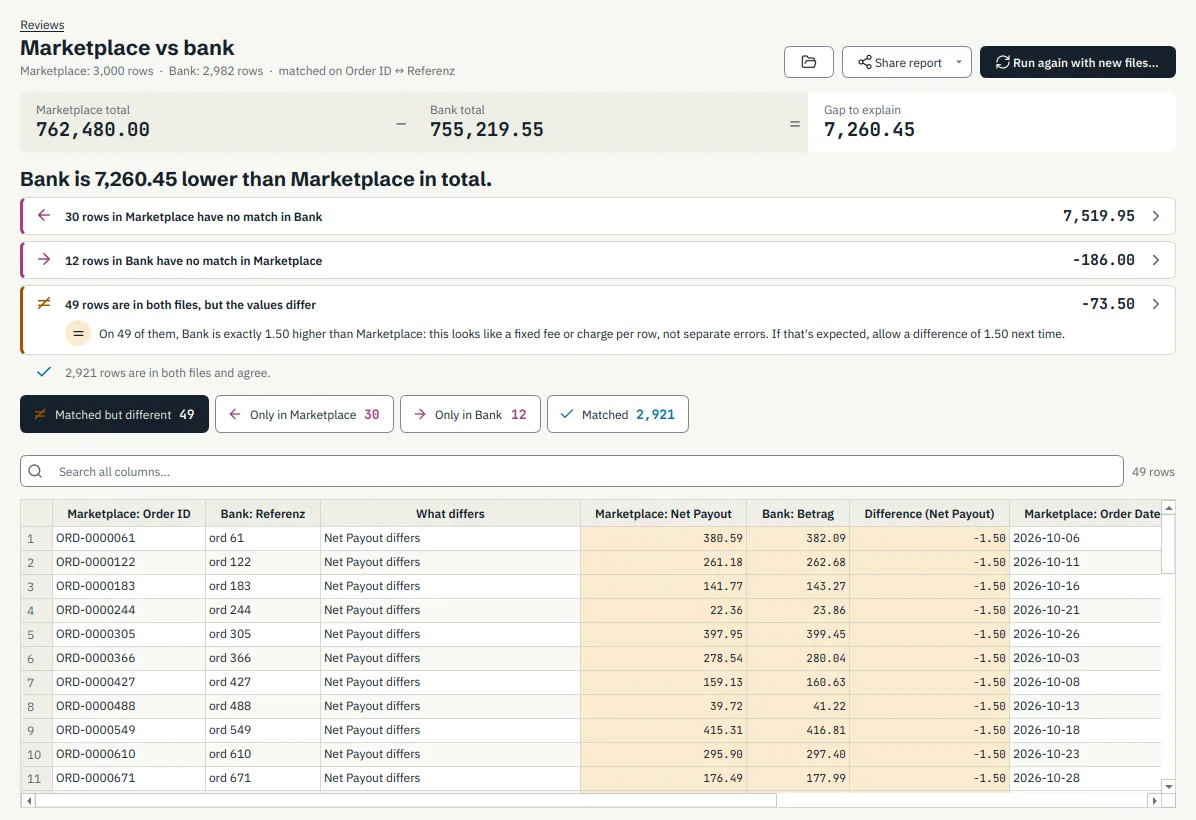
Not just which rows. Where the gap comes from.
After every run, Bijexa writes up what it found: one sentence on the gap, then each part with its share of it, biggest first. Where the numbers show a pattern, it says so: a hundred identical differences read as one fee, not a hundred errors.
Bank is 13,376.51 lower than Marketplace in total.
- 60 rows in Marketplace have no match in Bank+14,020.11
- 40 rows in Bank have no match in Marketplace−493.60
- 100 rows are in both files, but the values differ−150.00
On 100 of them, Bank is exactly 1.50 higher than Marketplace: this looks like a fixed fee or charge per row, not separate errors. If that's expected, allow a difference of 1.50 next time.
Patterns need at least 10 rows covering 80% of the rows they describe, and they say what the numbers show, never why. Flipped signs, repeated IDs and payments split across several rows are checked row by row. The amounts always add up to the gap.
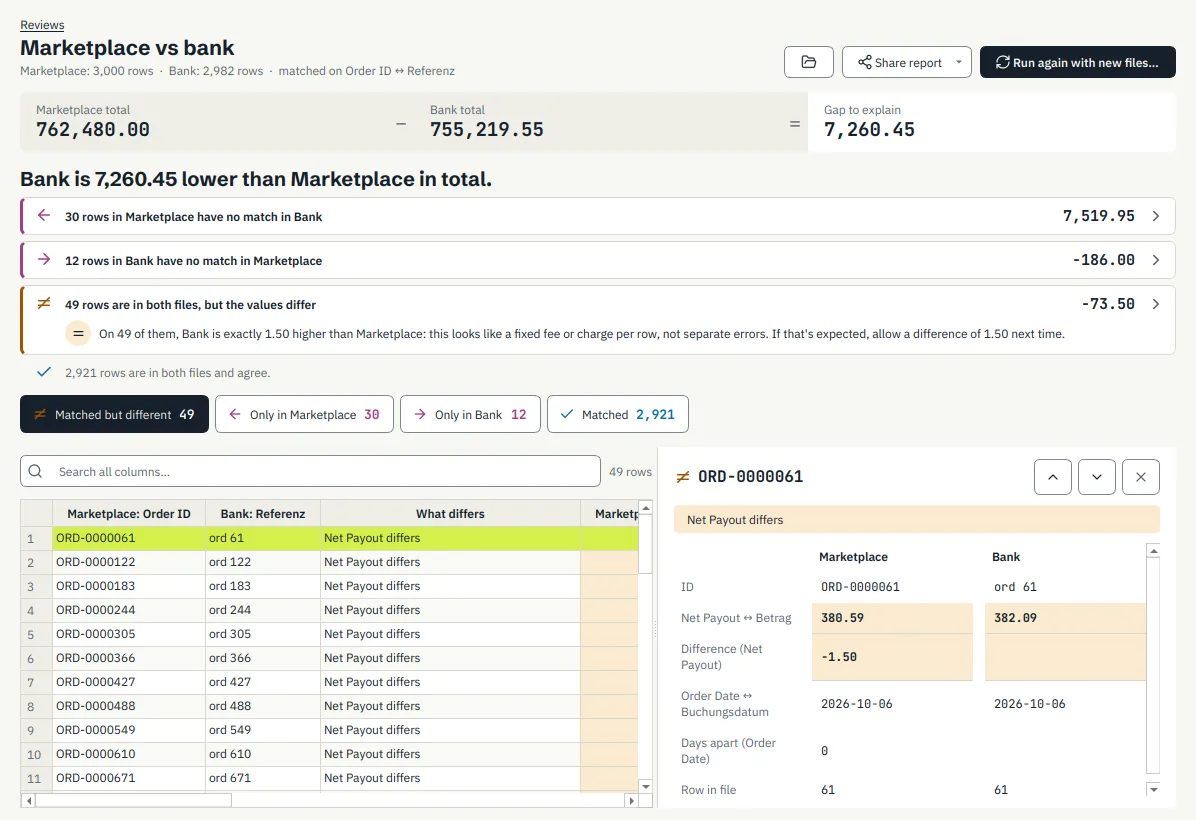
Check any row in one click
- Each order side by side: the ID, the amounts, the dates and every other column, from both files.
- The cells that disagree are tinted, and the reason is spelled out: “Net Payout differs”.
- Select rows to copy their IDs for your accounting system, or export just those rows.
- Every pile is a file you can open: CSV, Excel or Parquet, plus a one-page report to send.
The same difference on every row.
The same percentage on every row.
A few cents here and there.
Refunds booked the other way round.
Bank dates a fixed number of days later.
Several bank lines adding up to one payout.
The same ID twice in one file.
How it helps you
Same check, every client, every month.
- Match invoices to payments by invoice number, even when the bank writes it differently (INV-1042, Invoice 1042).
- Save one recipe per client and re-run it with the new exports.
- Send a one-page report; your working spreadsheet stays yours.
- Client bank data stays on your machine.
Your payout report and your bank disagree.
- See which orders were never paid and which were paid short.
- Read US and European number formats side by side, such as 1,234.50 and 1.234,50.
- If the bank shows one deposit for many orders, a grouping step comes first, and it works only where a shared reference appears on both sides. We are testing this on real payout files.
- Compare a payout in euros with a bank account in dollars, at the exchange rate you choose.
Files too big for one Excel sheet, a method you can repeat.
- Reconcile millions of rows the same way each period.
- Get differences that are itemised and reproducible.
- Export Parquet or CSV for the next step in your process.
What Bijexa adds beside your spreadsheet and your accounting software.
A spreadsheet is where you check; your accounting software matches the bank feed it is connected to. Bijexa does the step between them: it takes two files and says where the gap comes from.
| Tool | What it is for | What Bijexa adds |
|---|---|---|
| Your spreadsheet | Where you check and keep your workings. A sheet holds 1,048,576 rows. | Bijexa reads past that. |
| Your accounting software | Matches the bank feed it is connected to. | Bijexa starts from two files you export, so nothing needs connecting. |
| Online sync and reconciliation services | Put your sales into your books from the channels they connect to. | Bijexa runs on your computer when the files are what you have, or can't leave your machine. |
Already use a sync tool, QuickBooks or Xero? Keep it. They put your sales into your books; Bijexa checks that the books match the bank. The table describes each kind of tool in general; individual products vary.
Three million rows against three million.
Measured on 16 November 2026 on synthetic files, in our own runs and in a second run by a different tester on our team, on one 6-core machine with 15 GB of memory that also had other jobs running. It has also been run on 20 million synthetic rows a side, which took 6 to 8 minutes. These are measurements on files made for the test, not a benchmark; your files and computer will differ.
It found exactly what we planted
| Planted | Count | Found |
|---|---|---|
| Changed amounts | 14,955 | ✓ all |
| Missing rows | 9,009 | ✓ all |
| Extra rows | 6,000 | ✓ all |
Property-based tests check, on randomly generated file pairs in every test run, that every row lands in one pile and that the breakdown adds up exactly.
Your bank data stays where it is.
Some online tools work by uploading your bank and payout files. Bijexa reads them on your computer.
Nothing is uploadedBijexa runs on your computer and reads your files where they are. The report is a file you choose to send.
Formulas are neutralisedText like =HYPERLINK(…) in your data can't run when you open a result file.
Shared recipes are checkedA recipe with SQL text, an impossible tolerance or unknown fields is rejected with a clear message.
You can see what it didEvery pile is a file you can open, and the report lists the settings that produced it.
What each of these claims rests on, how it was tested and what is not covered: Security & privacy.
Three plans, priced by how many clients you cover.
Ordering is not open yet. The buttons put you on a waiting list by email, and no payment is taken on this site. The prices shown are the list prices that will apply when ordering opens.
Every plan splits the gap between your totals into parts that add up, to the cent, and writes the review. Without a licence key the app is a demo on its own sample files.
| Plan | Basic | Professional | Firm 5 | Firm 15 |
|---|---|---|---|---|
| Price, a year | US$149 | US$349 | US$890 | US$1,490 |
| Saved recipes | 3 | 25 | 100 | 300 |
| Users | 1 | 1 | 5 | 15 |
| Rows per input file | Up to 5,000 | No row limit | No row limit | No row limit |
| File types | CSV, Excel (.xlsx) | CSV, Excel (.xlsx), PDF, .xls, Parquet | CSV, Excel (.xlsx), PDF, .xls, Parquet | CSV, Excel (.xlsx), PDF, .xls, Parquet |
See where every cent of the gap comes from.
Drop in two files. Get where the gap comes from, not just the rows, on your own computer. Little setup.